
- Home
- BMW 5 Series
- E12
- General information
- Operation and maintenance
- On-board computer
On-board computer (BMW 5 Series E12)
As special equipment, the cars were equipped with an on-board computer, which was installed under the right central ventilation nozzle. On the front panel of the computer there is a digital display and several function keys. Below are instructions for using the computer.
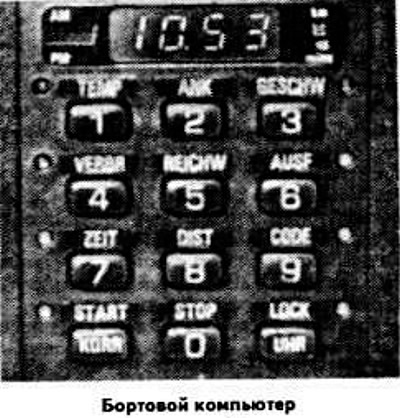
To set the time, press the UHR key several times until zero appears on the right side of the display. Press the corresponding keys to set the exact time. After the time indication disappears from the display, press the START key to begin counting the time (for example, by a time signal transmitted by radio). To display the time, with the ignition key in position "0", press the UHR button.
If the display shows information other than the time, pressing the LOCK key locks the display and prevents digital data entry; at the same time, the indicator to the right of the key lights up red. To return the time indication to the display, press the LOCK key again.
Pressing the KORR key erases any incorrectly entered information and saves previously entered data in memory.
If you press the 3/GESCHW and START keys in sequence, the average speed will be shown on the display for 8 seconds.
When entering the estimated average fuel consumption by pressing the key, the indicator to the left of the key lights up red. When this key and the key are pressed in sequence, the average fuel consumption is displayed on the display for 8 seconds. If the estimated average fuel consumption is exceeded, the indicator lights up with a red flashing light. If the driving speed is below 20 km/h, four dots flash on the display. To turn it off, press the 4/VERBR and STOP keys in sequence.
When the button is pressed, the display shows the distance the vehicle can travel with the remaining fuel in the tank for 8 seconds. If the distance is less than 15 km, four dots flash on the display. If the battery is discharged, the indication is incorrect. It becomes reliable when the fuel tank is full after the fuel reserve indicator lamp has been continuously lit for 3 km.
Pressing the key enters the distance to the intermediate point or to the point of route change, within 0-999 km. When approaching the point entered into memory, the indicator lights up with a green flashing light and a sound signal is emitted. When pressing the key while driving, the display shows the remaining distance to the intermediate point for 8 seconds. When pressing the 3/AUSF and STOP keys in succession, the indication disappears.
This key is used to program the time for switching on additional equipment (for example, an additional heating system) or the time of execution of any other function. To start counting the time, press the 7/ZEIT and START keys in sequence. When the set time has elapsed, a sound signal is emitted. When the 7/ZEIT key is pressed, the display shows the time of entering the information for 8 seconds; to erase it, press the 7/ZEIT and STOP keys in sequence.
This key is used to enter the distance to the destination within 0-999 km, when the ANK key is pressed, the estimated time of arrival is displayed on the display. When the 8/DIST key is pressed while driving, the remaining distance to the destination is displayed on the display for 8 seconds. When the 8/DIST and STOP keys are pressed in succession, the information entered into the computer memory is erased.
This key is used to code the anti-theft device when the ignition key is in position "1". To erase the code displayed on the display, turn the key to position "2". To enter the code into the computer memory and turn on the anti-theft device, turn the key to position "0". The green indicator to the right of the key goes out.
If you put the key back to position "1", the indicator lights up and the numbers 0000 appear on the display. Enter the correct code to turn off the anti-theft device, after which the display shows the current time and the indicator goes out.
After three attempts to turn on the starter or three incorrect entries of the code, the sound alarm is activated for 30 seconds and the anti-theft device remains in the operating mode.
To erase the code displayed on the display, before turning the key to position "0", press the CODE and STOP keys in sequence.
If you have forgotten the code, remove fuse No.21 and briefly turn on the hazard warning lights.
(The original text of the article is available on the resource «BMWman»)
Time setting and display lock key UHR/LOCK
To set the time, press the UHR key several times until zero appears on the right side of the display. Press the corresponding keys to set the exact time. After the time indication disappears from the display, press the START key to begin counting the time (for example, by a time signal transmitted by radio). To display the time, with the ignition key in position "0", press the UHR button.
If the display shows information other than the time, pressing the LOCK key locks the display and prevents digital data entry; at the same time, the indicator to the right of the key lights up red. To return the time indication to the display, press the LOCK key again.
Data correction and timer start key KORR/START
Pressing the KORR key erases any incorrectly entered information and saves previously entered data in memory.
If you press the 3/GESCHW and START keys in sequence, the average speed will be shown on the display for 8 seconds.
Average fuel consumption key 4/VERBR
When entering the estimated average fuel consumption by pressing the key, the indicator to the left of the key lights up red. When this key and the key are pressed in sequence, the average fuel consumption is displayed on the display for 8 seconds. If the estimated average fuel consumption is exceeded, the indicator lights up with a red flashing light. If the driving speed is below 20 km/h, four dots flash on the display. To turn it off, press the 4/VERBR and STOP keys in sequence.
Fuel remaining key 5/REICHW
When the button is pressed, the display shows the distance the vehicle can travel with the remaining fuel in the tank for 8 seconds. If the distance is less than 15 km, four dots flash on the display. If the battery is discharged, the indication is incorrect. It becomes reliable when the fuel tank is full after the fuel reserve indicator lamp has been continuously lit for 3 km.
Waypoint Distance Key 3/AUSF
Pressing the key enters the distance to the intermediate point or to the point of route change, within 0-999 km. When approaching the point entered into memory, the indicator lights up with a green flashing light and a sound signal is emitted. When pressing the key while driving, the display shows the remaining distance to the intermediate point for 8 seconds. When pressing the 3/AUSF and STOP keys in succession, the indication disappears.
Time programming key 7/ZEIT
This key is used to program the time for switching on additional equipment (for example, an additional heating system) or the time of execution of any other function. To start counting the time, press the 7/ZEIT and START keys in sequence. When the set time has elapsed, a sound signal is emitted. When the 7/ZEIT key is pressed, the display shows the time of entering the information for 8 seconds; to erase it, press the 7/ZEIT and STOP keys in sequence.
Distance to destination key 8/DIST
This key is used to enter the distance to the destination within 0-999 km, when the ANK key is pressed, the estimated time of arrival is displayed on the display. When the 8/DIST key is pressed while driving, the remaining distance to the destination is displayed on the display for 8 seconds. When the 8/DIST and STOP keys are pressed in succession, the information entered into the computer memory is erased.
Anti-theft device coding key 9/C0DE
This key is used to code the anti-theft device when the ignition key is in position "1". To erase the code displayed on the display, turn the key to position "2". To enter the code into the computer memory and turn on the anti-theft device, turn the key to position "0". The green indicator to the right of the key goes out.
If you put the key back to position "1", the indicator lights up and the numbers 0000 appear on the display. Enter the correct code to turn off the anti-theft device, after which the display shows the current time and the indicator goes out.
After three attempts to turn on the starter or three incorrect entries of the code, the sound alarm is activated for 30 seconds and the anti-theft device remains in the operating mode.
To erase the code displayed on the display, before turning the key to position "0", press the CODE and STOP keys in sequence.
If you have forgotten the code, remove fuse No.21 and briefly turn on the hazard warning lights.
(The original text of the article is available on the resource «BMWman»)
This article is available at russian, bulgarian, belarusian, ukrainian, serbian, croatian, romanian, polish, slovak, hungarian
Article verified: Polikarpov Saveliy
Share information:
Previous articles
БМВ E12: Operation and maintenance
Next articles
Similar articles on other types of BMW cars:
Diagnostics of faults of on-board electrical equipment — general… BMW 3 Series E46 (1998-2006)
On-board electrical equipment specifications BMW 7 Series E38 (1994-2001)
On-board diagnostic system (OBD) socket BMW X3 E83 (2003-2010)
On-board computer BMW X5 E53 (1999-2006)
Diagnostics of faults of on-board electrical equipment — general… BMW 3 Series E46 (1998-2006)
On-board electrical equipment specifications BMW 7 Series E38 (1994-2001)
On-board diagnostic system (OBD) socket BMW X3 E83 (2003-2010)
On-board computer BMW X5 E53 (1999-2006)
Link in different formats to this page
Visitor comments
No comments yet
- General information
- Governing bodies
- Manual
- Maintenance
- Power unit
- Engine repair
- Lubrication system
- Cooling system
- Ignition system
- Supply system
- Injection system (gasoline)
- Injection system (diesel)
- Exhaust system
- Transmission
- Clutch
- Car gearbox
- Front axle
- Rear axle
- Chassis
- Steering
- Brake system
- Wheels and tires
- Body
- Interior
- Exterior
- Heating system
- Electrical equipment
- Equipment and devices
- Power devices
- Windscreen wipers
- Electrical circuits
- General information
- Manual
- Maintenance
- Power unit
- Engine repair
- Ignition system
- Engine lubrication system
- Cooling system
- Fuel system (gasoline)
- Fuel system (diesel)
- Exhaust system
- Transmission
- Clutch
- Car gearbox
- Chassis
- Front and rear suspension
- Steering
- Brake system
- Body
- Exterior
- Interior
- Electrical equipment
- Heating system
- Equipment and devices
- Power devices
- Electrical circuits
- General information
- Manual
- Maintenance
- Power unit
- Engine in a car
- Engine overhaul
- Cooling system
- Supply system
- Ignition system
- Control system
- Transmission
- Clutch
- Manual gearbox
- Automatic gearbox
- Transmission line
- Chassis
- Steering
- Front suspension
- Rear suspension
- Brake system
- Body
- Body elements
- Car care and painting
- Electrical equipment
- Heater and air conditioner
- Equipment and devices
- Starter and generator
- Electrical circuits
- General information
- Operation and maintenance
- Specifications
- Power unit
- Engine repair
- Cooling and lubrication system
- Supply system
- Ecotronic power supply system
- Fuel injection system
- Ignition system
- Transmission
- Clutch
- Gearbox BMW 242/4
- Gearbox Getrag 262/8
- Gearbox Getrag 265/6
- Automatic gearbox
- Cardan gear
- Rear axle
- Chassis
- Steering
- Front suspension
- Rear suspension
- Brake system
- Electrical equipment
- Equipment and devices
- Electrical circuits