
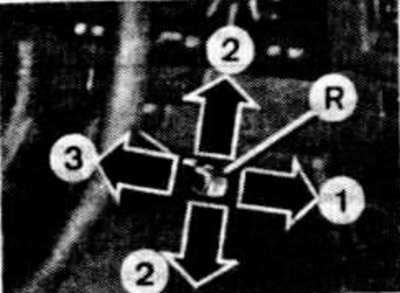
Speed control software lever:
R — lever; 1 — direction of movement of the lever when entering a constant speed of movement into memory; 2 — direction of movement of the lever to turn off the regulator; 3 — direction of movement of the lever to return to the previously entered speed of movement in memory.
To turn on the regulator, bring the vehicle speed to the desired value and move the regulator lever forward and release it. The vehicle speed is entered into the regulator's memory, which automatically maintains it constant. As long as the regulator lever is held in the forward position, it acts as a manual accelerator, i.e. the vehicle speed increases until the lever is released.
When braking the vehicle, disengaging the clutch, or setting the selector lever to position "A" ("D") or "N" (on cars with automatic transmission), and also when the set speed is exceeded or decreased by 30 km/h, the regulator switches off.
The previously selected speed, however, is not erased from the controller's memory and is gradually restored, provided that it has changed by no more than 30 km/h.
The regulator can also be switched off by moving the lever down or up along the steering column. To resume the car's movement at the last speed entered into the regulator's memory, pull the levers towards you.
When the ignition key is turned to position "1" or "0", the contents of the controller's memory are erased.
Attention. It is not recommended to use the regulator when driving heavily on roads that go through rough terrain, on slippery roads, or when driving conditions do not allow driving at a constant speed.