
- Direct switching on: Hold the "EIN" button pressed for 3 seconds until the LED starts flashing.
- Switching off: press the "AUS" button.
Programming the on time
Programming is possible starting from position "1" of the ignition key. Switch on the time display mode "UHR".
Each time the "ZEIT" button is pressed, the "Fan" symbol appears on the display and the numbers 1 or 2 alternately indicate the first or second time the heating and ventilation is switched on.
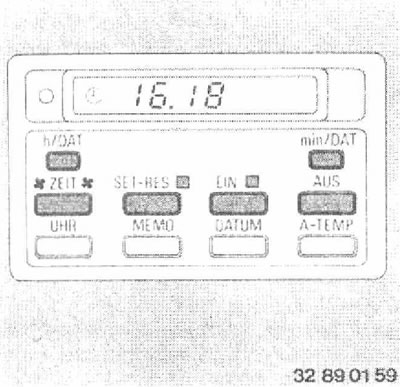
After selecting the desired number, you can then set the system's turn-on time:
Keep the "ZEIT" button pressed until the dot between the hour and minute indications starts flashing.
Set the desired time using the "h/DAT" and "min/DAT" buttons.
Press the "ZEIT" button again, the dot will stop flashing and the switch-on time will be programmed.
Switching on the system by time: (starting from position "1" of the ignition key): Press the "SET-RES" button, the LED will light until the heating/ventilation is automatically switched on.
The LED above the "EIN" button indicates that the system is turned on.
Switching off: Press the "SET-RES" button again, the LED goes out.
With the set switch-on time, the "SET-RES" button can be used to switch the heating/ventilation on and off as often as desired. The switch-on time is stored in memory until a new value is entered.
If there is an on-board computer, the "ZEIT" and "S/R" buttons are used.
The original article is posted on the resource: «BMWMAN»