
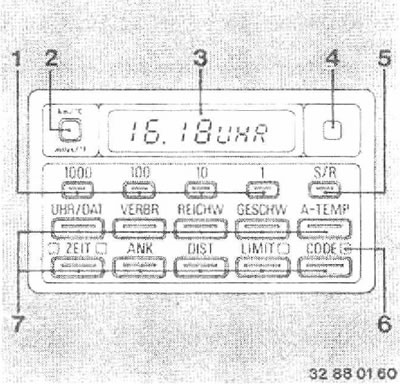
1 - Numeric value input buttons
2 - Units of measurement switch button
3 - Display
4 - Automatic indicator brightness controller (phototransistor)
5 - Start/Stop button ("S/R" or "START/RESET")
6 - Indicators (lEDs)
7 - Function buttons.
To assist the driver in safe and economical driving, the following information can be called up on the display:
- UHR/DAT - Time and Date
- VERBR - Two values of average fuel consumption
- REICHW - Estimated maximum range with a given fuel load (power reserve)
- GESCHW - Average speed
- A-TEMP - Outside temperature
- ZEIT - Stopwatch or timer for switching on the independent heater/ventilation
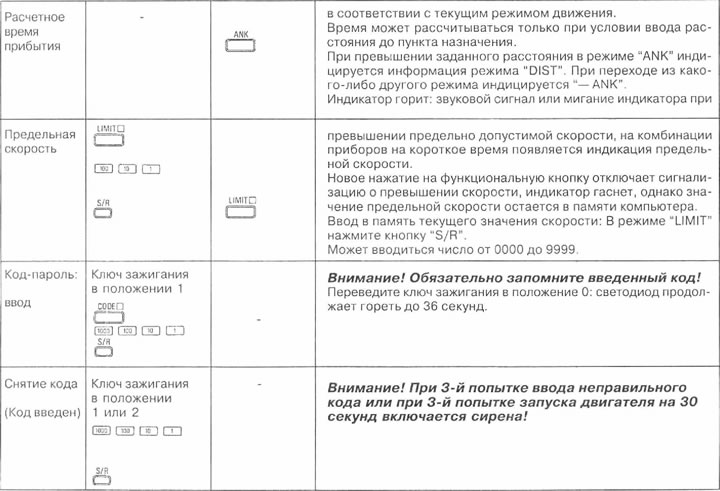
- ANK - Estimated time of arrival at destination
- DIST - Remaining distance to destination
- LIMIT - Maximum permissible speed
- CODE - Code-password
The on-board computer is switched on starting from the ignition key being set to position "1".
For safety reasons, enter the values before starting to move or after stopping the vehicle.
The following data can be called up on the display using the corresponding function keys:
- Average speed
- Average fuel consumption (on two sections of the path)
- Power reserve
- Outside temperature.
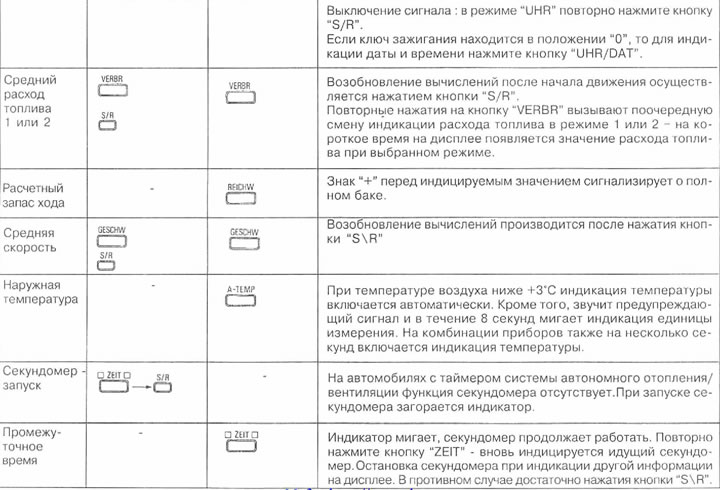
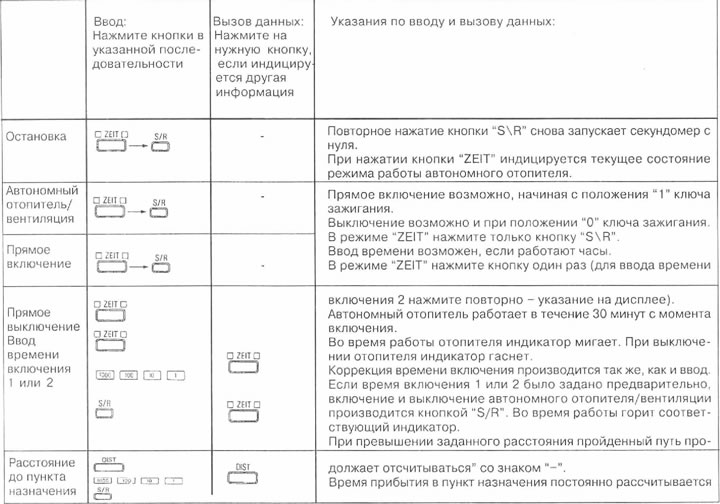
By pressing the desired function button and then the "S/R" button (5), you can restart or stop:
- Calculating average speed
- Calculating average fuel consumption 1 or 2
- Stopwatch or timer.
The input of the following numerical values is described below:
- Time and date
- Maximum permissible speed
- Heater/ventilation on time 1 or 2
- Distances to destination (to calculate the arrival time)
- Password code.
Using the unit selection button after pressing the desired function button, the display (except for the password code) will be produced in either the metric or English system of units.
Remote control
Press the turn signal switch:
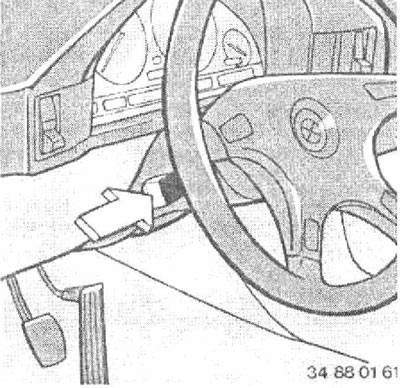
Additionally, the instrument cluster displays data that will appear sequentially (except BMW 5201). In this case, the indication on the computer display is independent of the indication on the instrument cluster.
Switching off the indicator on the instrument cluster: press the self-diagnosis button ("CHECK-CONTRTOL") on the instrument cluster or the "CODE" button.
Note: Self-monitoring system messages have priority over the on-board computer information and replace it if necessary.
If you need to call up specific information on the instrument cluster, proceed as follows:
- Press the turn signal switch lever for 3 seconds until the message "Progl" appears (in the on-board computer "P1").
- Press the desired function button. For example, if you are interested in average fuel consumption 2 (not 1), then after pressing the VERBR button, press the unit switch buttons (2). Further pressing of the unit switch button will cause a sequential change in the consumption 1 and consumption 2 indication. The date and time indication is switched in a similar manner.
- Press the "S/R" button.
If you want to display all the information again with sequential indication on the instrument cluster display, do the following:
- Press the turn signal switch lever for 3 seconds until the message "Progl" appears (in the on-board computer "P1").
- Press the "S/R" button.
When there is a power outage, for example when replacing the battery, all data stored in the computer's memory is erased.
When the power supply is restored, the date and time should be re-entered into the computer, as well as, if necessary, the heating/ventilation system start time, the distance to the destination and the maximum speed.
If the "PPPP" fault code is displayed, contact your BMW service.
Attention:
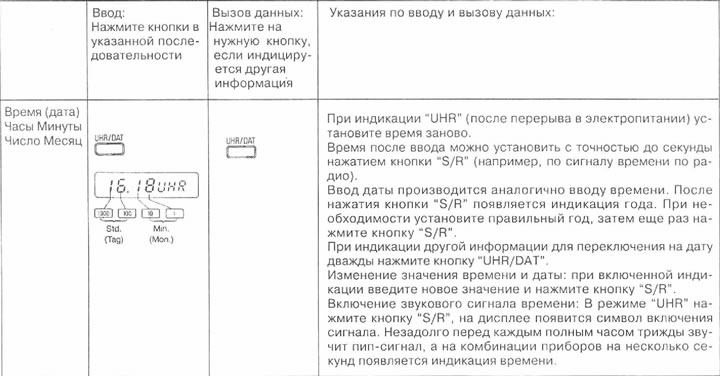
- The buttons are arranged in decimal order: 1000, 100, 10, 1
- Unreal values are not entered into memory.
- Entering a new number erases the value in memory and can be done by pressing the decimal buttons in any sequence.
- To enter a value into memory, press the "S/R" button.
- Each time you press a button or hold the button down, every ½ second the value in the corresponding digit increases by one.
[The original article is posted on the resource: BMWMAN.RU]