
Table of contents: Remote control ↓ Entering and retrieving information…↓
- Home
- BMW 5 Series
- E28
- General information
- Manual
- On-board computer
On-board computer (BMW 5 Series E28)
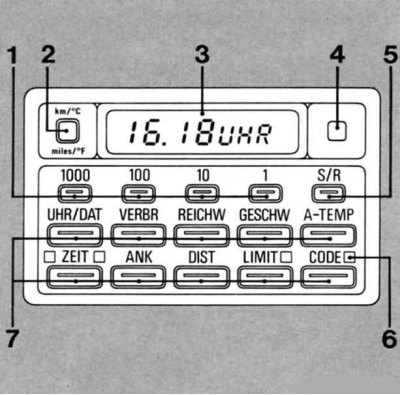
1 - Numeric data entry keys
2 — Unit switching key
3 - Digital indication
4 - Phototransistor for automatic regulation of indicator brightness
5 - Start/stop key SET/RES
6 — Light-emitting diodes (LED)
7 — Information call keys
To ensure safe and economical driving, the following information is displayed on request:
- UHR/DAT — Time and Date
- VERBR — Average fuel consumption on two sections of the route
- REICHW — Estimated range
- GESCHW — Average Speed
- A-TEMP - Outside temperature
- ZEIT — Stopwatch or 2 time periods for switching on parking heating/ventilation
- ANK - Estimated Time of Arrival
- DIST — Remaining distance to the destination
- LIMIT — Maximum speed
- CODE - Anti-theft protection
The trip computer is ready for operation when the ignition key is turned to position 1.
Input always produce data in the interests of security before the start trips or when the vehicle is stationary.
By pressing the appropriate information call key, you can request the following information without prior entry:
- average speed;
- average fuel consumption on sections of the route 1 and 2;
- outside temperature.
By pressing the corresponding call key, pressing the SET/RES key (5), you can restart or stop the information:
- average speed;,
- average fuel consumption in sections 1 and 2;,
- timer or, if necessary, 2 periods for switching on the parking heating/ventilation, and by pressing the UHR button, you can call up or turn off the hourly time reminder signal.
The order of entering numerical data:
- time and date;
- maximum speed;
- timing of switching on parking heating/ventilation;
- distance to the destination (what is the basis for calculating arrival time);
- anti-theft protection is described below..
Using the unit switching key (2), each type of information (except code) after calling it up with the corresponding key, it can be displayed in metric or English units, as desired.
When the current supply to the circuit is interrupted, for example when the battery is replaced, all data in the memory is erased.
When power is restored, you must re-enter the time, date and time of switching on, distance and maximum speed.
If the "PPPP" interference indicator is displayed, contact your BMW service.
Remote control
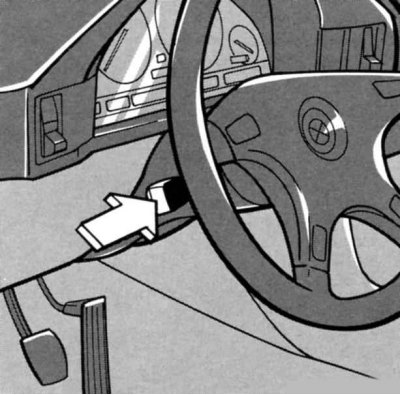
Briefly press the turn signal switch lever.
The information appears additionally in the instrument cluster (except BMW 520i, 525tds - in preparation) and can be requested sequentially.
The information displayed by the on-board computer is independent of its display in the instrument cluster.
To turn off the indicator in the instrument cluster, press the control and signal display button in the instrument cluster or the CODE button.
The control display messages obscure the display of the trip computer data.
If you want to get all the information on the instrument cluster, then:
- press the turn signal switch lever for 3 seconds, the display will show Prog 1 (in the on-board computer - P1);
- press the SET/RES key.
If you want to have a specific selection of information on the instrument cluster, then in this case:
- press the turn signal switch lever for 3 seconds, the display will show Prog 1 (in the on-board computer - P1);
- press the corresponding information call key.
When calculating the average consumption in two sections and when setting the switching times for the parking heating/ventilation, observe the following rule. If, for example, both consumptions are to be displayed, the VERBR key must be pressed twice. However, if only the consumption in the second section and not in the first section is to be displayed, then after pressing the VERBR key, press the unit switching key km/mls (when the switch key is pressed further, the flow rate in the first and second sections is indicated alternately).
To display the first and second time periods for switching on the parking heating/ventilation, proceed in the same way.
- Press the SET/RES key.
Entering and retrieving information on the on-board computer
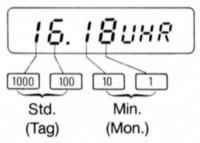
Please note! Input is in decimal order:
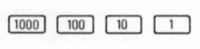
Unreal numerical data is not accepted by the system.
When entering a new number, the numbers in memory are erased: numerical data can be entered in any sequence of decimal places.
To write data into memory, press the SET/RES button.
The numerical value increases accordingly by one after each key press or every half second while the key is pressed.
| Input: press the keys in the sequence shown | Call: Press the next key to call the required information |
Time (Date) | |  |
Average fuel consumption on sections 1 or 2 | |  |
Power reserve | — |  |
Average speed | |  |
Outside temperature | — |  |
Timer - start |  → →  | — |
Current time | — | |
Stop | → | — |
Parking heating/ventilation - Direct activation | → | — |
Live connection | → | — |
Entering the on time 1 or 2 | | |
Remaining distance to destination | DIST | DIST |
Estimated time of arrival
| ANK | |
Speed limit or speed limit
| | |
Code, anti-theft protection:
| Key in position 1
| — |
| Key in position 1 or 2
(enter code) |
|
| Instructions for entering and calling |
Time (Date) | When indicated - UHR (after the current supply is stopped) re-enter the time data. The clock can be started with the accuracy of the second after entering the data using the SET/RES key (for example, by radio time signal). Entering the date is similar to entering the time. After pressing the SET/RES button, the year data appears. If necessary, enter new numbers and press the SET/RES button again. The date can be displayed in a different way - to do this, press the UHR/DAT button twice. To correct the time or date, change the numerical value and then press the SET/RES button. Hour signal - after the UHR button, press the SET/RES button - the symbol for the activated horn function appears. Before each full hour has elapsed, a signal sounds and the time display appears briefly in the instrument cluster. Switching off - with the UHR time request activated, press the SET/RES button. Calling up the time and date when turning the ignition key to position 0 - press the UHR/DAT button. |
Average fuel consumption on sections 1 or 2 | After starting the movement, pressing the SET/RES button makes the computer perform a new calculation. Pressing the VERBR button again selects the average consumption for the first and second sections alternately - after a short time, a digital indication of the selected fuel consumption appears. |
Power reserve | The plus sign () in front of the displayed value means the fuel tank is "full". |
Average speed | After the start of movement, when you press the SET/RES button, the computer makes a new calculation. |
Outside temperature | If the outside temperature drops below 3°C, a warning signal sounds, the temperature is displayed automatically and the temperature units flash for 8 seconds; the instrument cluster displays the temperature. |
Timer - start | For vehicles with parking heating/ventilation, timer function (stopwatch) missing. When the timer is running, the LED lights up. |
Current time | The LED is flashing. Press the ZEIT key again - the indication of the running timer will appear. |
Stop | The current time countdown is stopped if other information is available. Usually it is enough to press the SET/RES key. Pressing the SET/RES key again starts a new time countdown. Pressing the ZEIT button displays the status of the parking heating/ventilation. Direct activation with the key in the ignition switch in position 1. |
Parking heating/ventilation - Direct activation | |
Live connection | Switching off in position 0. With the time request key pressed, press only the SET/RES key. |
Entering the on time 1 or 2 | Data entry is only possible when the clock is on. In ZEIT mode, press the key once, to enter a second time, press the key again (indication on the display). When the LED is lit, the operating time of the parking heating/ventilation can be set for up to 30 minutes, starting from the moment of start-up. During the operation of the parking heating/ventilation, the LED flashes. It goes out when the system is switched off. The correction of the switching time is carried out similarly to the input of information. After entering switching time 1 or 2, the system is switched on by pressing the SET/RES key. When activated, the corresponding LED lights up. |
Remaining distance to destination | If the entered distance has been covered, then further counting is done with a minus sign. |
Estimated time of arrival
| The estimated time of arrival is constantly adjusted depending on the driving style. The call is only possible if the distance has been set in advance. After passing the distance - when pressing the ANK key, the DIST data appears. When switching from the position of any other key, the following appears: - ANK. |
Speed limit or speed limit
| The LED lights up: when the set speed is exceeded, an audible signal sounds and the corresponding LED flashes, the stored speed limit briefly appears in the instrument cluster. When the information call-up button is pressed again, the warning signal is switched off, the LED goes out, but the stored value is saved. Entering the current speed - with the LIMIT button pressed, press the SET/RES button.
|
Code, anti-theft protection:
| Code numbers from 0000 to 9999 can be entered. Be sure to remember the code number!The key in the ignition switch is in position 0 - the LED lights up for 36 hours. |
| After the third incorrect code entry or the third start attempt, a siren sounds for 30 seconds! |
The key in the ignition switch is in position 0 - the LED lights up for 36 hours.
- deactivation
After the third incorrect code entry or the third start attempt, a siren sounds for 30 seconds!
Additional explanations on the on-board computer
(Making changes to the information program is only possible after pressing the corresponding information call key).
Time and date are called up alternately by pressing the key again. Entering the year serves to take into account leap years when displaying the date.
By using a specific command to start a new calculation, the average fuel consumption for the entire trip and for a specific section of the route can be calculated simultaneously.
The estimated range is induced, calculated on the basis of the fuel reserve data and taking into account the driving style. If four segments flash on the display, the range is less than 15 km. It is necessary to refuel! The on-board computer registers refueling if the key in the ignition switch is turned to position 1 or 0 and more than 5 liters are added. The plus sign (+) in front of the numerical value indicates that the actual range is greater than the displayed value, which is a consequence of the limitation in measuring the fuel level.
The warning signal is repeated if, since the last warning, the temperature has risen to 6°C at least once and dropped again to 3°C. The warning signal does not exclude the possibility of black ice at temperatures above 3°C, for example on bridges and roadways in the shade.
Timer: Max. timer operation time is 99 hours and 59 minutes. Time is displayed on the display first in seconds and tenths of a second, after one minute in minutes and seconds, after one hour in hours and minutes.
Parking heating/ventilation: Pressing this button again will display in sequence, current system status, switch-on time 1, switch-on time 2, repeat, etc.

The speed limit can be either reset or recalled. The warning is repeated if the speed limit has been undershot once by at least 5 km/h.

When the system is switched on, the engine hood, radio and starter are monitored. If the hood is not closed or the radio is removed, then when the key in the ignition is turned to position O, the LED flashes for about 10 seconds. When the system is switched on, turn the key in the ignition to position 1 or 2 - a gong signal and the display - Code mean that the code is ready to be entered. When the starter is switched on without entering a code, a long gong sounds and the engine does not start.
Deactivation if you have forgotten the code number:
- disconnect the battery for 5 minutes;
- turn the ignition key to position 1, the siren will sound;
- the display shows a 15-minute time interval counting down;
- after 15 minutes the engine can be started.
If you remember the code number, you can enter it immediately, without waiting for 15 minutes to pass:
- press the CODE key; press the SET/RES key;
- start the engine.
This article is available at russian, bulgarian, belarusian, ukrainian, serbian, croatian, romanian, polish, slovak, hungarian
Article verified: Zhuravleva Isolda
Share information:
Previous articles
БМВ E28: Manual
Next articles
Similar articles on other types of BMW cars:
Diagnostics of faults of on-board electrical equipment — general… BMW 3 Series E46 (1998-2006)
On-board electrical equipment specifications BMW 7 Series E38 (1994-2001)
On-board diagnostic system (OBD) socket BMW X3 E83 (2003-2010)
On-board computer BMW X5 E53 (1999-2006)
Diagnostics of faults of on-board electrical equipment — general… BMW 3 Series E46 (1998-2006)
On-board electrical equipment specifications BMW 7 Series E38 (1994-2001)
On-board diagnostic system (OBD) socket BMW X3 E83 (2003-2010)
On-board computer BMW X5 E53 (1999-2006)
Link in different formats to this page
Visitor comments
No comments yet
- General information
- Governing bodies
- Manual
- Maintenance
- Power unit
- Engine repair
- Lubrication system
- Cooling system
- Ignition system
- Supply system
- Injection system (gasoline)
- Injection system (diesel)
- Exhaust system
- Transmission
- Clutch
- Car gearbox
- Front axle
- Rear axle
- Chassis
- Steering
- Brake system
- Wheels and tires
- Body
- Interior
- Exterior
- Heating system
- Electrical equipment
- Equipment and devices
- Power devices
- Windscreen wipers
- Electrical circuits
- General information
- Manual
- Maintenance
- Power unit
- Engine repair
- Ignition system
- Engine lubrication system
- Cooling system
- Fuel system (gasoline)
- Fuel system (diesel)
- Exhaust system
- Transmission
- Clutch
- Car gearbox
- Chassis
- Front and rear suspension
- Steering
- Brake system
- Body
- Exterior
- Interior
- Electrical equipment
- Heating system
- Equipment and devices
- Power devices
- Electrical circuits
- General information
- Manual
- Maintenance
- Power unit
- Engine in a car
- Engine overhaul
- Cooling system
- Supply system
- Ignition system
- Control system
- Transmission
- Clutch
- Manual gearbox
- Automatic gearbox
- Transmission line
- Chassis
- Steering
- Front suspension
- Rear suspension
- Brake system
- Body
- Body elements
- Car care and painting
- Electrical equipment
- Heater and air conditioner
- Equipment and devices
- Starter and generator
- Electrical circuits
- General information
- Operation and maintenance
- Specifications
- Power unit
- Engine repair
- Cooling and lubrication system
- Supply system
- Ecotronic power supply system
- Fuel injection system
- Ignition system
- Transmission
- Clutch
- Gearbox BMW 242/4
- Gearbox Getrag 262/8
- Gearbox Getrag 265/6
- Automatic gearbox
- Cardan gear
- Rear axle
- Chassis
- Steering
- Front suspension
- Rear suspension
- Brake system
- Electrical equipment
- Equipment and devices
- Electrical circuits